Clay 3D step-by-step video — Clay mascot style
Make a step-by-step tutorial with a clay look: an orange mascot plugged into one socket per step, pastel backgrounds by chapter, clay objects that pop.
Enthalten ab Starter, mit allen 81 Stilen plus deinen eigenen · Vorschau gerendert von der ClipOnIt-Engine
So sieht dieser Stil aus
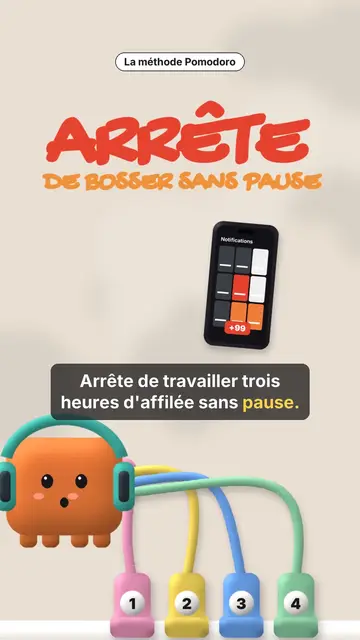
Clay mascot gives your video a soft, cute 3D clay look. In the centre, an orange cube mascot wearing a helmet is connected by coloured cables to numbered sockets. Each socket is a step: when a new chapter starts, a plug bounces and connects, and the pastel background changes colour, cream, pink, sea green or midnight blue. The mascot's face changes too, happy, surprised, with stars or hearts in its eyes.
Chapter titles are handwritten in marker, with their numbered badge, and a small black pill spells out the idea. Clay objects pop on the word: a phone full of notifications, a stopwatch, a bookshelf, a monitor, a list being ticked, a card, a giant number. A yellow note can stick to the object, confetti falls on the win, and the end shows “COMMENT” with a ticked recap of every step.
Passende Themen
Avoid: grave topics, investigations or hard news: the cute look would not fit. Also avoid topics without steps; the mascot needs a socket to plug in for each idea.
- Productivity methodsOne socket per step: viewers see how many are left and where they are.
- Tool round-upsEach tool plugs its socket and pops its clay object, then the recap ticks them all.
- Beginner tutorialsThe soft look and the mascot make a technical topic approachable.
- Routines and habitsThe stopwatch, the ticked list and the confetti reward each step kept.
Videoideen in diesem Stil
- The Pomodoro method
The red “STOP” hook, four sockets, the stopwatch, the silenced phone and the ticked recap.
- 4 apps to learn a language
One socket per app, the clay phone and the number of minutes a day.
- Plan your week in 5 minutes
The list being ticked, the yellow note stuck on and the confetti at the end.
- 3 settings for a faster computer
The clay monitor, three numbered sockets and the mascot with star eyes.
In 1 Klick verfügbar
- Link dieses Stils öffnen
Der Button „Video in diesem Stil erstellen“ öffnet den Editor mit diesem bereits ausgewählten Stil. Ohne Konto dauert die Anmeldung eine Minute und braucht keine Karte.
- Schreibe dein Thema in einem Satz
Eine Idee reicht. Du kannst auch deinen Text einfügen oder ab Starter ins Mikrofon sprechen: Das Video baut dann auf deiner Stimme auf.
- Prüfen, dann rendern
Die KI schreibt die Szenen, wählt die Elemente des Stils aus und taktet sie passend zu den Worten, mit Stimme und Untertiteln. Du korrigierst, was nicht stimmt, dann ist das vertikale MP4 in wenigen Minuten da.
Was du anpassen kannst
For each scene you pick the opening red hook, the chapter title and its pill, the background colour, a clay object popping on the word (phone, stopwatch, bookshelf, monitor, list, card, number or element), the yellow note, the mascot's mood, the confetti and the word to comment with the recap.
Häufig gestellte Fragen
Kostenlos oder nicht, Ausgabe, Nutzung: die kurzen Antworten.
How many steps can I show?
Each new chapter title adds a numbered socket. Four to six steps stay readable in a 30 to 60 second video.
Kann ich meine eigene Stimme verwenden?
Yes. Record yourself or import your audio: sockets plug in and objects pop on your words.
How is it different from Felt kitchen?
Felt kitchen plays out a metaphor with two wool puppets. Clay mascot follows a list of steps, one socket per step, with clay objects.
Ist dieser Stil im kostenlosen Tarif enthalten?
Nein, es ist im Starter enthalten ($29/Monat): 15 Videos ohne Wasserzeichen pro Monat, alle 81 Stile plus deine eigenen. Der kostenlose Plan bietet 3 Videos pro Monat mit Wasserzeichen in 8 anderen Stilen: Pixel News, Press paper, Comedy cartoon, Class sketch, Night tale, Social screen, Retro synthwave und Flat vector.
Wenn dir dieser Stil gefällt
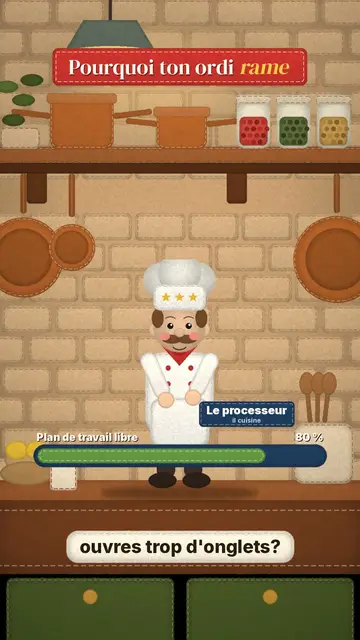
Stop-motion explainer video
Felt kitchen style · A retro wool kitchen in stop-motion, where a chef and an apprentice act out the explanation.
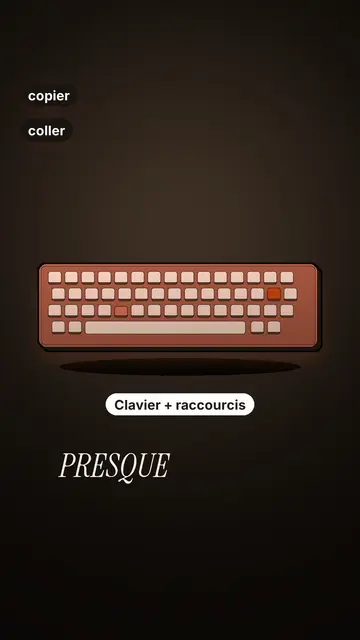
Tech tutorial video maker
Terracotta studio style · Tutorials told with UI cards floating in light 3D on cream: numbered labels, rolling counters, terracotta title plates.
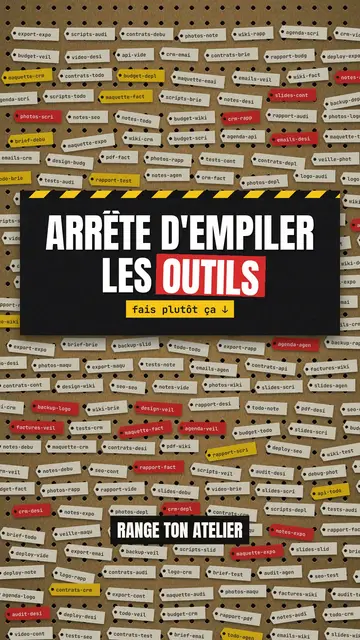
Step-by-step method video
Pegboard workshop style · Everything hangs on a cardboard pegboard: falling labels, gauges, caution tape.
Deine Idee in diesem Stil
Schreib einen Satz oder sprich ihn ein: Der Stil ist schon ausgewählt, wenn du im Editor ankommst.